


- 抢先体验最新商城网站上线,为你提供全新购物体验
- 网件官网推出全球首款5G路由器,速度惊人
- 专业的网站制作公司应该选择哪家?
- seo整站优化系统怎么使用?
- 做网站怎么挣钱?这几种方式让你轻松实现网赚梦想
- PHP网站搭建详细教程,从零开始轻松打造个人网站
- 如何免费注册个人com网站
- 东莞网站设计方案如何选择最适合自己的?
- 岳阳网站建设一站式服务,让您的网站更具竞争力
- 网络组建工程师是做什么的?
- 如何快速创建一个个人网站的方法和技巧
- 郑州如何打造专业网站并提升网站流量
- 抢滩新媒体领域,成为运营界的明日之星
- 如何用网页设计制作技能赚取第一桶金?
- 网站推广的基本方法有哪些(掌握网站推广的关键技巧)
- 网络建设与维护的关键技巧与实践经验分享
- 如何利用自动化工具设计制作网站(让你的网站建设变得更加轻松快捷)
- 如何做一个优秀的网站设计(从用户体验到视觉风格,全面解析)
- 如何给网络公司取一个适合的名字(3个步骤教你打造品牌)
- 如何快速搭建一个网站(0基础小白也能学会的实用教程)
- 重庆网站建设推广服务怎么选择最优质的公司?
- 如何成为一名互联网营销师?(详细解析互联网营销师资格证考试)
- 佛山网站设计公司哪家好?
- 如何将网页快捷方式创建到桌面
- 温州网站建设方案报价(详解如何选择最适合你的方案)
- 网络销售平台哪个好用?推荐几个靠谱的平台
- 6个网站维护工作内容详解
- 创建网站需要花费吗?
- 如何利用手机轻松创建自己的网站
- vi设计是什么?初学者必须要知道的基本概念
文章目录
- 第一步 创建vue项目
- 使用vue
- script标签引入
- npm安装vue
- vue项目的创建
- 第二步 vue-router、vuex、element ui、axios安装和配置
- main.js
- vue-route(vue路由管理)
- 安装
- 配置
- 全局守卫配置(router.beforeEach前置守卫、router.beforeEach后置守卫)
- vuex (vue状态管理)
- 安装
- 配置
- element ui(基于vue的组件库)
- 安装
- 配置(按需引入)
- 按需引入区别?
- axios (前后端交互)
- 安装
- 配置
- 第三步:配置不同环境的后端请求地址(开发、测试、正式)
- vue.config.js (基础配置+代理跨域、sass全局样式、图标引入、打包分析、生成环境去除console.log、splitChunks 单独打包第三方模块)
第一步 创建vue项目
使用vue
script标签引入
如果只是单纯的使用vue,可以使用直接引入
npm安装vue
- 使用npm安装vue需要先安装node.js,如果你的电脑未安装node,可以参考我的个人碰到的前端问题总结及解决方案2第15个问题先安装nvm(node version manager),然后再安装npm。
- npm install -g cnpm --registry=https://registry.npm.taobao.org (装完之后运行这个换下npm源,改成国内的,下载依赖速度会快些
- 安装好npm后,全局安装vue-cli(vue脚手架),命令如下,个人推荐安装vueCli3及以上版本(毕竟现在脚手架已经5.0了)。
//安装vueCli2
npm install vue-cli -g
//安装vueCli3及以上
npm install @vue/cli -g

vue项目的创建
创建vue项目有三种方式
- 编程工具直接创建。
比如webstorm创建项目如下:
第一步:点击文件 --> 点击新建 --> 点击项目
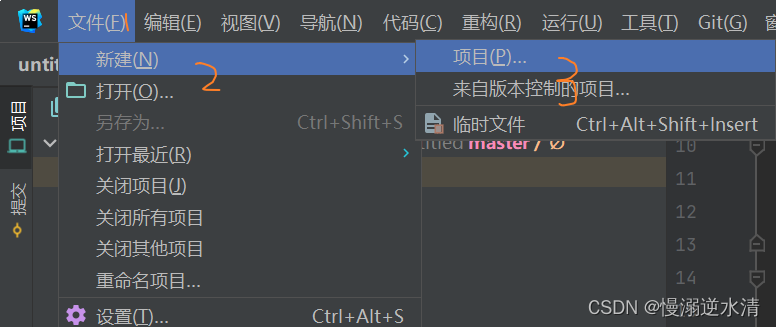
第二步:选择vue项目 --> 选择项目目录(我这里是默认的,可以自己修改)–> 选择要构建项目的vueCli位置,可以选择自己本地安装的vueCli目录,也可以使用webstorm默认的npx命令执行vueCli --> 创建项目

- vue ui创建。可视化的操作,创建、安装初始化依赖简单。但需要注意是若想使用vue的UI界面来创建项目,需先安装vue脚手架 3.0以上的版本。详细创建的步骤可以看下面参考的链接。
参考:使用图形化界面创建vue项目
- vueCli创建。
参考:五分钟教你使用vue-cli3创建项目(三种创建方式,小白入门必看)
第二步 vue-router、vuex、element ui、axios安装和配置
main.js
vue-router、vuex、element ui安装配置完后都需要在src目录下main.js(主js入口)里进行引用才会生效。
main.js
/**
 * normalize.css重置浏览器css样式。
 * 这里需要`npm install normalize.css`
 * reset和normalize区别。
 * reset的目的是将所有的浏览器的自带样式重置掉,这样更易于保持各浏览器渲染的一致性。
 * normalize的理念则是尽量保留浏览器的默认样式,不进行太多的重置,而尽力让这些样式保持一致并尽可能与现代标准相符合。
*/
import "normalize.css/normalize.css";
import Vue from "vue";
import App from "./App.vue";
import router from "./router"; //vue-router
import store from "./store"; //vuex
import "@/plugins/element-ui"; //按需引入的element组件
import './permission' //页面权限(vue-router的全局守卫配置)
Vue.config.productionTip = false;
new Vue({
  router,
  store,
  render: (h) => h(App),
}).$mount("#app");
vue-route(vue路由管理)
安装
打开项目,在项目目录下运行下面命令进行安装。项目的package.json的dependencies里有vue-router就代表安装成功了。如果之前已经有了就不用执行安装命令。结果如图。
//vue2
npm install vue-router@3.6.5
//vue3
npm install vue-router
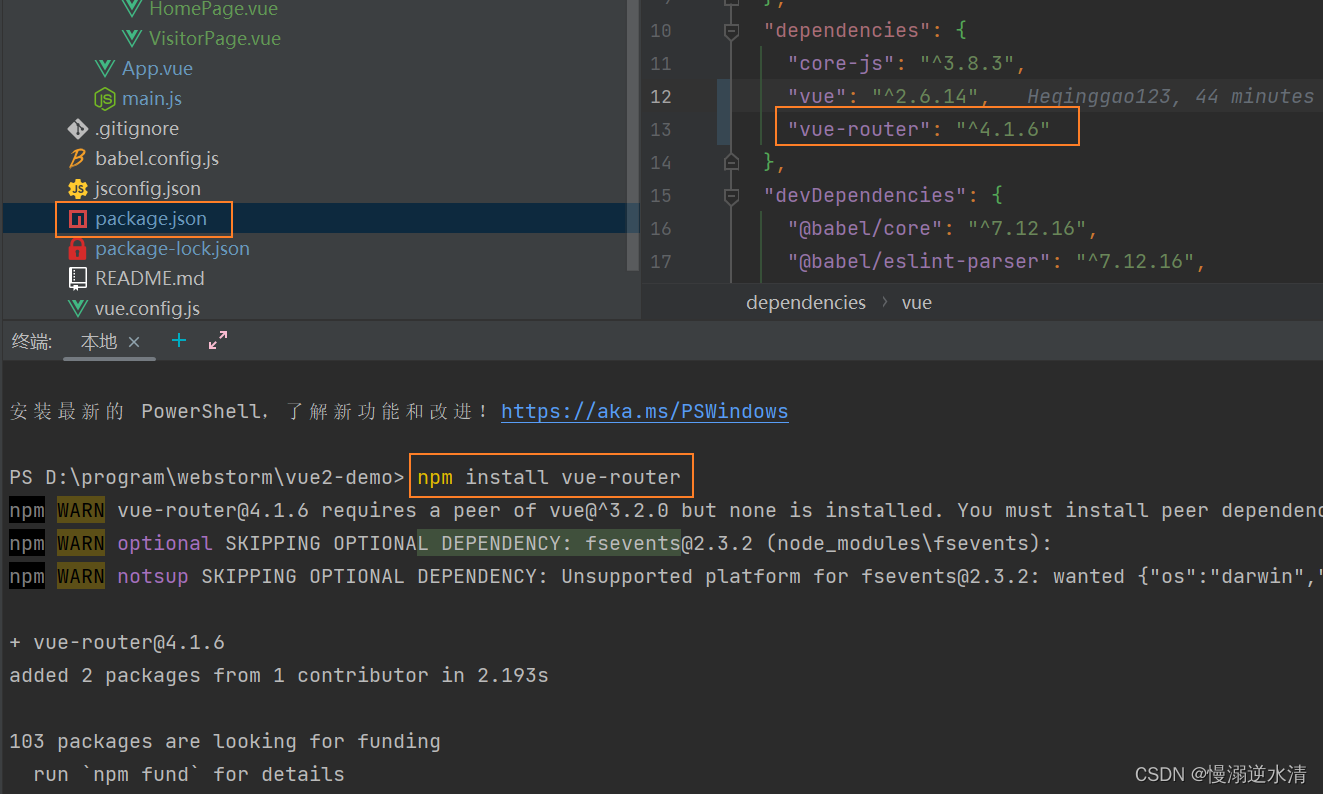
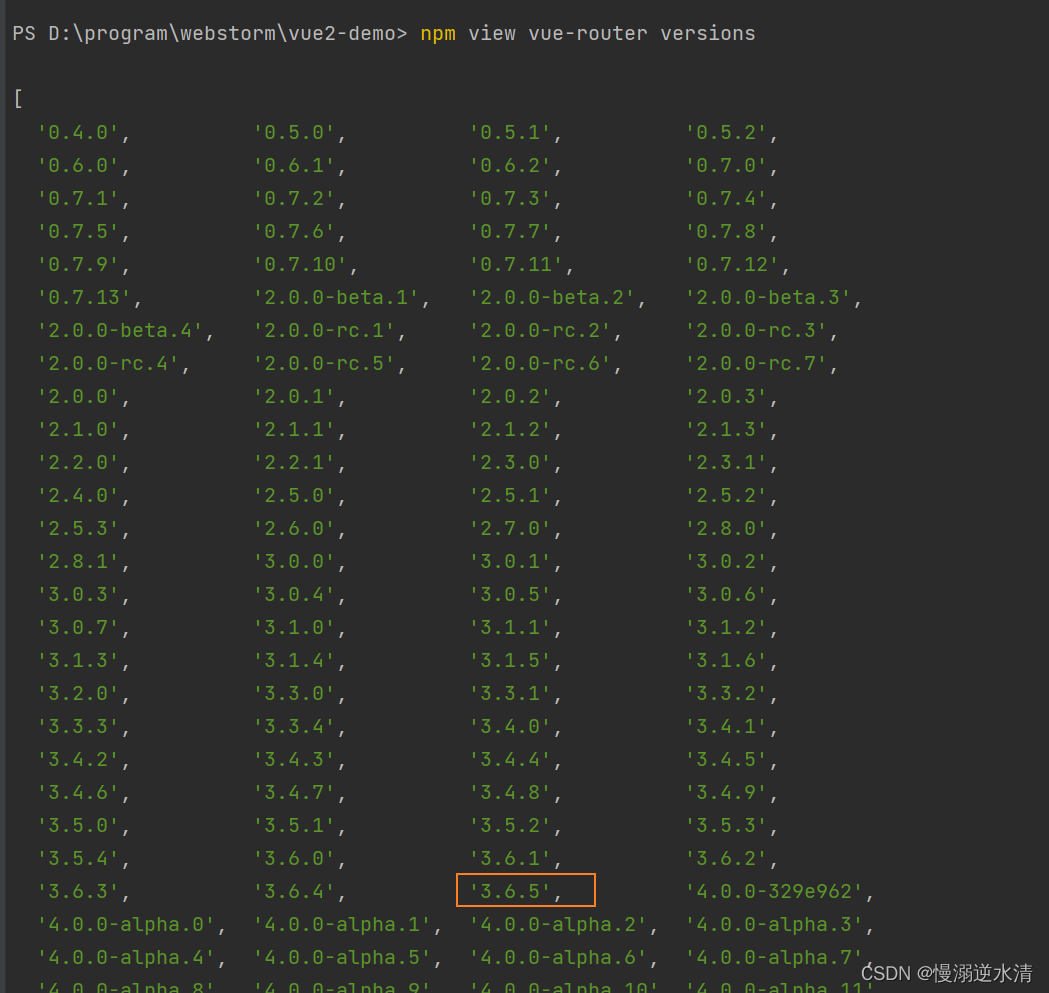
需要注意的是如果你使用的是vue2,那么不要直接npm install vue-router,这样会安装最新版本即4.x版本的vue-router,4.x版本的vue-router与vue2不兼容。
查看vue-router版本命令如图。
配置
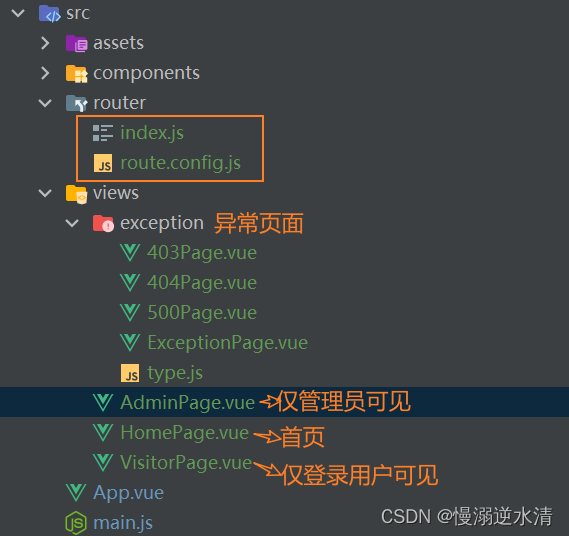
项目src目录下新建router目录。内容如图。
- index.js里生成vue-router实例,并配置相关信息,然后暴露出去。
- router.config.js里存放页面路由信息。
分为静态路由和动态路由。
动态路由与用户角色权限相关,可配合后端存放取出。
index.js内容如下。
import Vue from "vue";
import Router from "vue-router";
import { constantRouterMap } from "@/router/route.config";
// 【优化】访问online功能测试 浏览器控制台抛出异常
try {
    // 保存原来的push函数
    const originalPush = Router.prototype.push;
    // 重写push函数
    Router.prototype.push = function push(location, onResolve, onReject) {
        if (onResolve || onReject)
            return originalPush.call(this, location, onResolve, onReject);
        // 调用原来的push函数,并捕获异常
        return originalPush.call(this, location).catch((err) => err);
    };
} catch (e) {
    console.log(e);
}
Vue.use(Router);
const createRouter = () =>
    new Router({
        mode: "history", //hash、history两种模式
        base: process.env.BASE_URL,
        routes: constantRouterMap,
        scrollBehavior: () => ({ y: 0 }),
    });
const router = createRouter();
/**
 * 重置注册的路由导航map
 * 主要是为了通过addRoutes方法动态注入新路由时,避免重复注册相同name路由
 *
 * 修改用户角色、用户退出时调用
 */
export function resetRouter() {
    const newRouter = createRouter();
    router.matcher = newRouter.matcher; // reset router
}
export default router;
router.config.js内容如下:
import HomePage from "@/views/HomePage";
/**
 * constantRouterMap
 * 没有权限要求的基本页
 * 所有角色都可以访问
 * 不需要动态判断权限的路由
 */
export const constantRouterMap = [
    {
        path: "/",
        name: "home",
        component: HomePage,
        meta: {
            title: "首页",
        },
    },
    {
        path: "/403",
        name: "403",
        component: () => import("@/views/exception/403Page"),
    },
    {
        path: "/500",
        name: "500",
        component: () => import("@/views/exception/500Page"),
    },
];
/**
 * 动态菜单,走权限控制
 *
 * 可从后端获取
 * 可分多个角色
 * 这里分为二个角色 管理员admin  普通角色 visitor
 */
export const asyncRouterMap = [
    {
        path: "/onlyAdminCanSee",
        name: "adminPage",
        component: () => import('@/views/AdminPage'),
        meta: {
            title: "管理员页面",
            keepalive: false,
            roles: ["admin"],
        },
    },
    {
        path: "/onlyLoginUserCanSee",
        name: "visitPage",
        component: () => import('@/views/VisitorPage'),
        meta: {
            title: "用户界面",
            keepalive: false,
            roles: ["admin", "visitor"],
        },
    },
    { path: '*', redirect: '/404',component: () => import('@/views/exception/404Page') }
];
全局守卫配置(router.beforeEach前置守卫、router.beforeEach后置守卫)
在src下新建permission.js,需要在main.js里引用。
需要安装一个轻量级的进度条组件NProgress
内容如下。
import Vue from "vue";
import router from "./router";
import store from "./store";
import NProgress from "nprogress"; // progress bar
import "nprogress/nprogress.css"; // progress bar style
import {ACCESS_TOKEN} from "@/store/mutation-types";
NProgress.configure({showSpinner: false}); // NProgress Configuration
const whiteList = ['/login','/home'] // 页面路由白名单
//前置守卫
router.beforeEach(async (to, from, next) => {
    NProgress.start(); // start progress bar
//判断是否是去登录页面,是,直接过
    if (to.path === '/login') {
        next()
        NProgress.done()
    } else {
	//不是去登录页面,判断用户是否登录过
	    if (Vue.ls.get(ACCESS_TOKEN)) {
	            const hasRoles = store.getters.userRoles && store.getters.userRoles.length > 0
	            //登录了,判断是否有用户详细信息(如果有),比如角色权限,直接过
	            if (hasRoles) {
	                next()
	            } else {
	            	//没有用户详细信息,代表用户刷新了,或者其他行为,重新获取一次用户信息,
	                // 并根据该用户的角色权限,来获取用户权限范围内能看到的界面
	                try {
	                    //获取当前角色
	                    const {roles} = await store.dispatch('app/getInfo')
	                    //根据权限查询动态路由
	                    const accessRoutes = await store.dispatch('permission/generateRoutes', roles)
	                    //添加动态路由
	                    for (let i = 0; i < accessRoutes.length; i++) {
	                        const element = accessRoutes[i]
	                        router.addRoute(element)
	                        // router.addRoute('globalLayout', {
	                        //   path: element.path,
	                        //   name: element.path.slice(1, 2).toUpperCase() + element.path.slice(2),
	                        //   component: () => import('@/' + element.component),
	                        //   // meta: {
	                        //   //     // title: '',
	                        //   //     roles: [roles],
	                        //   // }
	                        // })
	                    }
	                    // console.log(router.getRoutes())
	                    //decodeURIComponent
	                    const redirect = from.query.redirect || to.path
	                    if (to.path === redirect) {
	                        // 确保addRoutes已完成 ,set the replace: true so the navigation will not leave a history record
	                        next({...to, replace: true})
	                    } else {
	                        // 跳转到目的路由
	                        next({path: redirect})
	                    }
	                } catch (error) {
	                    console.log(error)
	                    await store.dispatch('app/Logout').then(() => {
	                        next({path: '/login', query: {redirect: to.fullPath}})
	                    })
	                    NProgress.done()
	                }
	            }
	    }
	    else {
	        //如果没有登录
	        if (whiteList.indexOf(to.path) !== -1) {
	            // 在免登录白名单,直接进入
	            next()
	        } else {
	        //跳转到登录页面
	            next({path: '/login', query: {redirect: to.fullPath}})
	            NProgress.done()
	        }
	    }
	}
});
vuex (vue状态管理)
安装
运行npm 安装命令。结果如图。
//vue2
npm install vuex@3.6.2
//vue3
npm install vuex
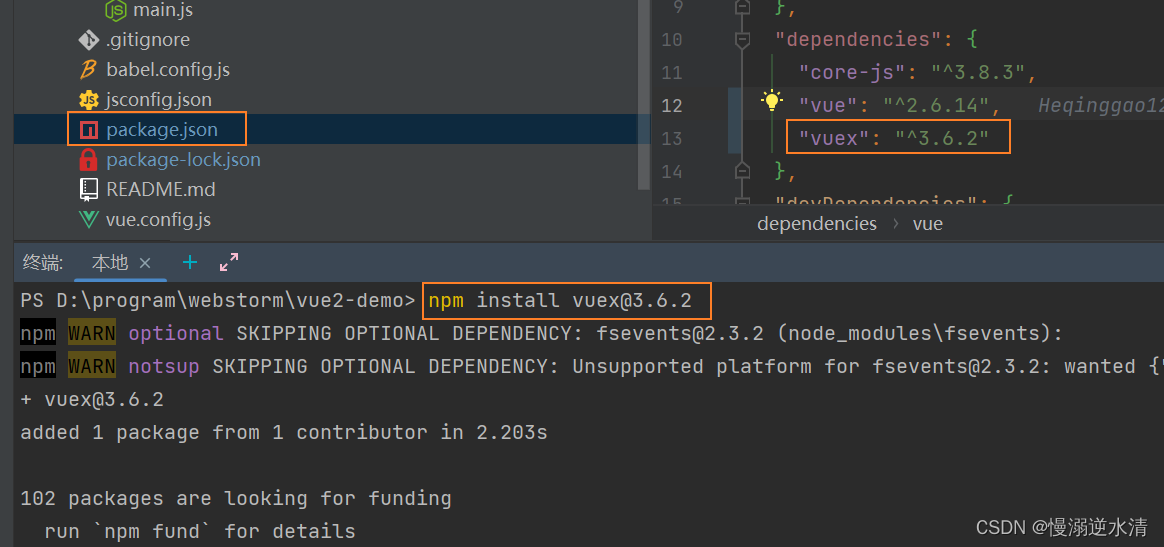
需要注意的是如果你使用的是vue2,那么不要直接npm install vuex,这样会安装最新版本即4.x版本的vuex,4.x版本的vuex与vue2不兼容。
查看vuex版本命令如图。
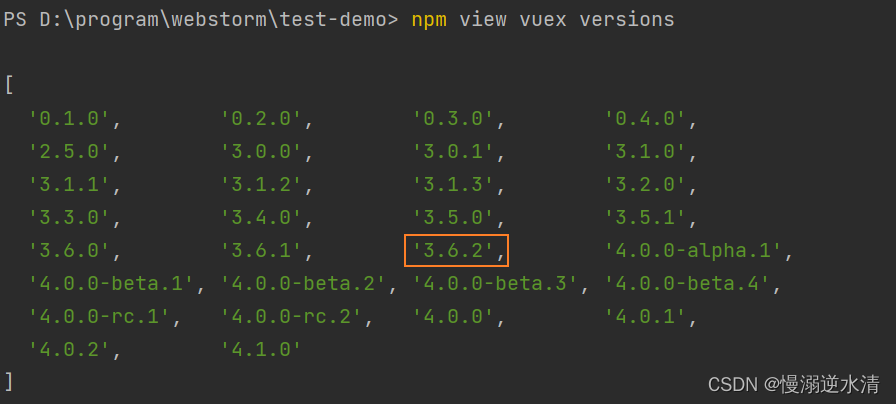
参考:vue2.0只能安装vuex3.x版本,最高3.6.2,vue3.0才能装vuex4.x版本
配置
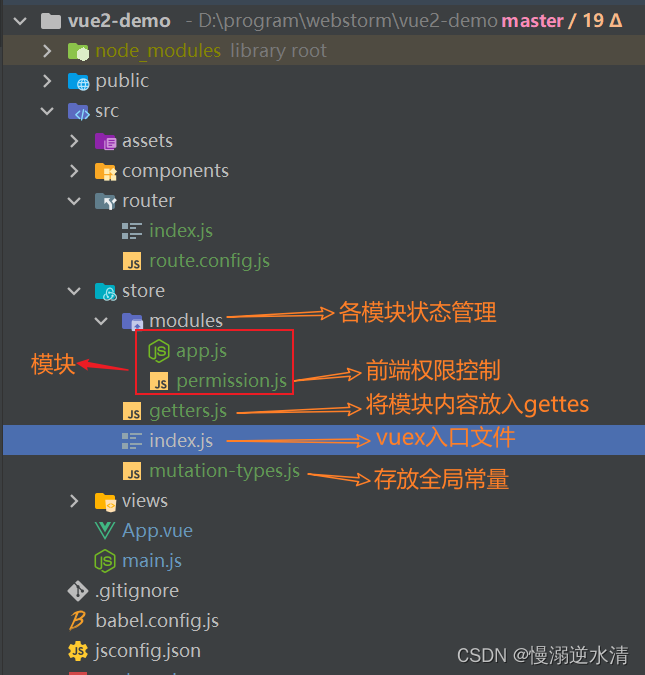
项目src目录创建store目录,内容如图。
- index.js vuex的路口文件
- modules 项目各模块的状态管理,如果项目比较小的话,可以直接将内容写在入口文件里
permission.js里存放的是前端权限管理方法和操作。权限如果是前端控制才有会用到。即动态路由内容存放在前端。
- mutation-type.js 存放全局变量,比如请求头token名、登录状态名等
index.js
// you do not need `import app from './modules/app'`
// it will auto require all vuex module from modules file
const modules = modulesFiles.keys().reduce((modules, modulePath) => {
  // set './app.js' => 'app'
  const moduleName = modulePath.replace(/^\.\/(.*)\.\w+$/, '$1')
  const value = modulesFiles(modulePath)
  modules[moduleName] = value.default
  return modules
}, {})
const store = new Vuex.Store({
  modules,
  getters
})
export default store
app.js
const state = {
  showText:'hello world',
}
const mutations = {
  SET_SHOW_TEXT(state,showText){
    state.showText=showText
  }
}
const actions = {}
export default {
  namespaced: true,
  state,
  mutations,
  actions
}
permission.js
import { constantRouterMap, asyncRouterMap } from "@/router/route.config";
/**
 * 通过meta.role判断是否与当前用户权限匹配
 * @param roles
 * @param route
 */
function hasPermission(roles, route) {
  if (route.meta && route.meta.roles) {
    // return roles.some(role => route.meta.roles.includes(role))
    if (route.meta.roles.indexOf(roles) >= 0) {
      return true;
    } else {
      return false;
    }
  } else {
    return true;
  }
}
/**
 * 递归过滤异步路由表,返回符合用户角色权限的路由表
 * @param routes asyncRoutes
 * @param roles
 */
export function filterAsyncRoutes(routes, roles) {
  const res = [];
  routes.forEach((route) => {
    const tmp = { ...route };
    if (hasPermission(roles, tmp)) {
      if (tmp.children) {
        tmp.children = filterAsyncRoutes(tmp.children, roles);
      }
      res.push(tmp);
    }
  });
  return res;
}
const state = {
  routes: [],
  addRoutes: [],
};
const mutations = {
  SET_ROUTES: (state, routes) => {
    state.addRoutes = routes;
    state.routes = constantRouterMap.concat(routes);
  },
};
const actions = {
	//根据角色权限过滤生成动态路由
  generateRoutes({ commit }, roles) {
    return new Promise((resolve) => {
      let accessedRoutes;
      accessedRoutes = filterAsyncRoutes(asyncRouterMap, roles);
      commit("SET_ROUTES", accessedRoutes);
      resolve(accessedRoutes);
    });
  },
};
export default {
  namespaced: true,
  state,
  mutations,
  actions,
};
mutation-types.js
//将常量放在单独的文件中,方便协作开发
export const ACCESS_TOKEN = "Access-Token"; //token存储名字
export const USER_INFO = "Login_Userinfo";
element ui(基于vue的组件库)
安装
npm 命令
npm i element-ui -S
配置(按需引入)
为什么要按需引入?
按需引入的目的是只引入用到的组件,以达到减小项目体积的目的。
要实现按需引入需要安装babel-plugin-component依赖
安装命令npm i babel-plugin-component -D,安装成功后需要在babel.config.js配置
module.exports = {
	/**
	compact: false解除babel处理文件的大小被限制在了500kb的限制,
  用来解决npm run dev或者npm run build 出现...exceeds the max of 500KB
  */
  compact: false,
  presets: [
    ["@vue/cli-plugin-babel/preset"],
    ["@babel/preset-env", { modules: false }], //es2015
  ],
  plugins: [
    [
      "component",
      {
        libraryName: "element-ui",
        styleLibraryName: "theme-chalk",
      },
    ],
  ],
};
官网的按需引入会报错,‘es2015’改成’@babel/preset-env’,就好了
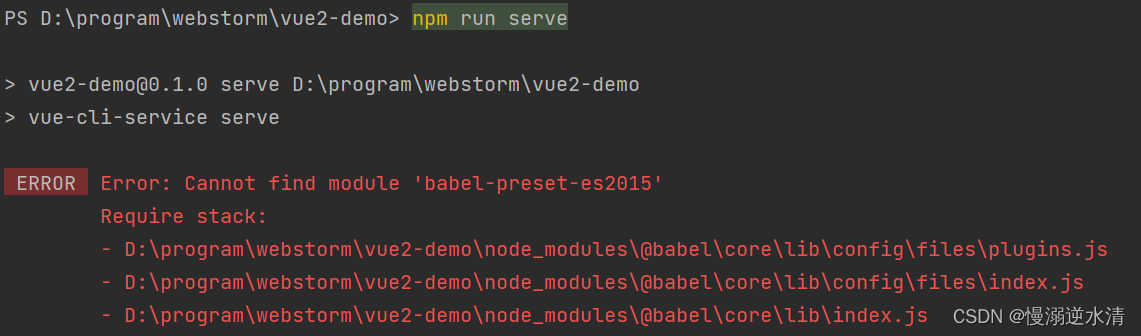
然后就是按需引入element组件内容。
我是在src目录下新建了个plugins目录,如图。
element-ui.js里面存放的element按需引入的组件。
这里我引入了Button、Message、MessageBox组件,button组件首页HomePage有用到,Message、MessageBox消息组件下面的axios拦截器配置里有用到。
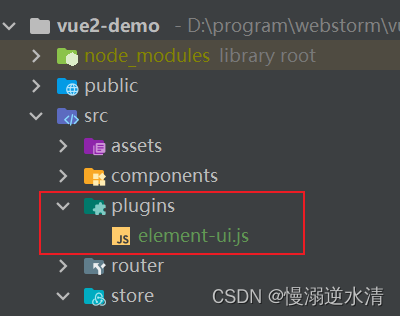
element-ui.js
// 按需全局引入 element ui组件
import Vue from "vue";
import { Button,MessageBox } from "element-ui";
import { Message } from "element-ui";
// import { message } from "@/config/message"; //全局配置message
Vue.use(Button);
Vue.prototype.$message = Message;
Vue.prototype.$msgbox = MessageBox;
Vue.prototype.$alert = MessageBox.alert;
Vue.prototype.$confirm = MessageBox.confirm;
Vue.prototype.$prompt = MessageBox.prompt;
按需引入区别?
vant-ui(移动端组件库)使用babel-plugin-import按需引入,element-ui使用babel-plugin-component,两者有啥区别?
babel-plugin-import 是 ant-design 团队出的,可以说其他绝大部分按需引入的插件都是在此基础上魔改的。
babel-plugin-component 是饿了么团队在前者的基础上做了一些改动。主要是因为 fork 的时间太早(2016 年 4 月),饿了么修复了一些早期 bug 却并没有 PR 到 ant-design 的仓库里去,但后来 ant-design 也有修复;再就是后来 ant-design 的有一些配置项的变动、而饿了么团队却没有跟进合并。所以二者还是有一些差异的。
参考:babel-plugin-import 实现按需引入
axios (前后端交互)
安装
npm 安装命令
npm install axios
配置
在项目src目录下创建utils目录用来存放项目的工具类:
- request.js :创建axios实例,并配置axios的请求和响应拦截器。
- 请求拦截器一般会全局添加请求头token或调用element的loading组件。响应拦截器用来对于请求的报错信息进行提示。
创建api目录用来存放模块请求接口:
- index.js:引入utils目录下的request的axios实例,来封装一般的axios请求,比如get、post以及文件下载等请求。
- testApi (模块名): 项目模块引入index.js,请求后端。
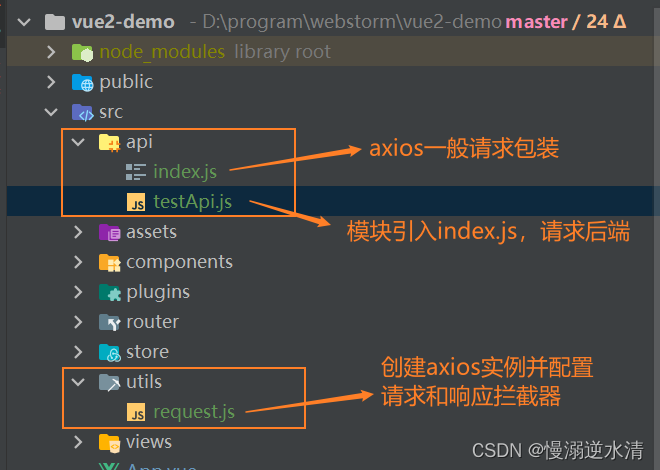
utils/request.js
import Vue from "vue";
import axios from "axios";
import store from "@/store";
import { Message, MessageBox } from "element-ui";
import { ACCESS_TOKEN } from "@/store/mutation-types";
// 创建axios 实例
const service = axios.create({
  baseURL: "/api", // api base_url
  timeout: 90000, // 请求超时时间
});
const err = (error) => {
  if (
    error.code === "ECONNABORTED" ||
    error.message === "Network Error" ||
    error.message.includes("timeout")
  ) {
    Message.error("请求超时,请稍候重试");
  }
  if (error.response) {
    let data = error.response.data;
    const token = Vue.ls.get(ACCESS_TOKEN);
    console.log("------异常响应------", token);
    console.log("------异常响应------", error.response.status);
    var pathName = window.location.pathname;
    switch (error.response.status) {
      /**
       * 401:未授权,请重新登录、403:拒绝访问、404:很抱歉,资源未找到!、408:请求超时
       * 500:服务器内部错误、502:网关错误、504:网络超时、505:HTTP 版本不受支持
       */
      case 401:
        Message.error("未授权,请重新登录");
        if (token) {
          store.dispatch("Logout").then(() => {
            setTimeout(() => {
              window.location.reload();
            }, 1500);
          });
        }
        break;
      case 403:
        Message.error("拒绝访问");
        break;
      case 404:
        Message.error("很抱歉,资源未找到!");
        break;
      case 408:
        Message.error("请求超时");
        break;
      case 500:
          Message.error("服务器内部错误");
        break;
      case 502:
        Message.error("网关错误");
        break;
      case 504:
        Message.error("网络超时");
        break;
      case 505:
        Message.error("HTTP 版本不受支持");
        break;
      default:
        Message.error(data.message || data);
        break;
    }
  }
  return Promise.reject(error);
  // return Promise.reject(new Error(error))
};
// 请求拦截器,一般用来添加请求token和请求方法加loading
service.interceptors.request.use(
  (config) => {
    const token = Vue.ls.get(ACCESS_TOKEN);
    if (token) {
      config.headers["X-Access-Token"] = token; // 让每个请求携带自定义 token 请根据实际情况自行修改
    }
    return config;
  },
  (error) => {
    return Promise.reject(error);
    // return Promise.reject(new Error(error))
  }
);
// 响应拦截器
service.interceptors.response.use((response) => {
  return response.data;
}, err);
export { service as axios };
api/index.js
import { axios } from "@/utils/request";
/**
 * get请求
 * @param url 请求api
 * @param parameter 请求参数
 */
export function getAction(url, parameter) {
  return axios({
    url: url,
    method: "get",
    params: parameter,
  });
}
/**
 * post请求
 * @param url 请求api
 * @param parameter 请求参数
 */
export function postAction(url, parameter) {
  return axios({
    url: url,
    method: "post",
    data: parameter,
  });
}
export function postAction1(url, parameter) {
  return axios({
    url: url,
    method: "post",
    data: parameter,
    contentType: "application/json", //请求头类型
  });
}
export function postAction2(url, parameter) {
  return axios({
    url: url,
    method: "post",
    data: parameter,
    timeout: 300000, // 请求超时时间
  });
}
/**
 * post method= {post | put}
 */
export function httpAction(url, parameter, method) {
  return axios({
    url: url,
    method: method,
    data: parameter,
  });
}
/**
 * put请求
 */
export function putAction(url, parameter) {
  return axios({
    url: url,
    method: "put",
    data: parameter,
  });
}
/**
 *  delete请求
 */
export function deleteAction(url, parameter) {
  return axios({
    url: url,
    method: "delete",
    params: parameter,
  });
}
/**
 * 下载文件 用于excel导出
 */
export function downFile(url, parameter) {
  return axios({
    url: url,
    params: parameter,
    method: "get",
    responseType: "blob",
  });
}
api/testApi
import {postAction} from "@/api/index";
//登录
const login=(params)=>postAction("/sys/login",params);
export {
    login
}
第三步:配置不同环境的后端请求地址(开发、测试、正式)
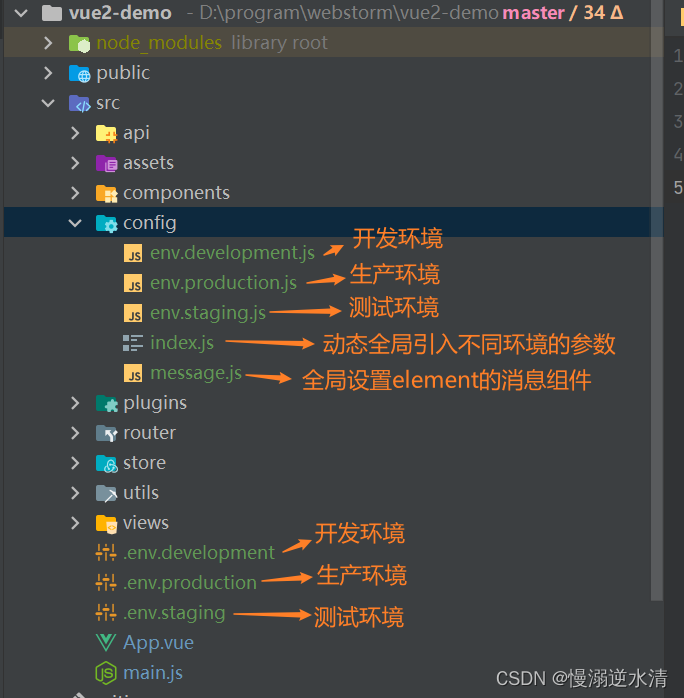
在src目录新建config目录。
- index.js 根据当前所属环境动态引入参数,比如开发环境下就会引入env.development.js下的变量内容。
- env.*.js配置全局的环境参数,比如后端请求地址,项目的静态文件引用的cdn地址,端口号等
在项目目录下创建.env.*文件。
- .env.* 是会根据npm命令调用,里面配置不同环境的参数。
- 注意:千万不要建到src目录下,这样会导致如果你在.env.*里创建了VUE_APP_开头的环境变量后,在其他地方使用process.env.VUE_APP_*就会报undefined,查不到。
自问自答环节:.env.*就可以根据不同环境定义不同环境的参数,为啥还定义index.js和env.*.js?
答:个人觉得这个更友好吧,含义更清晰。
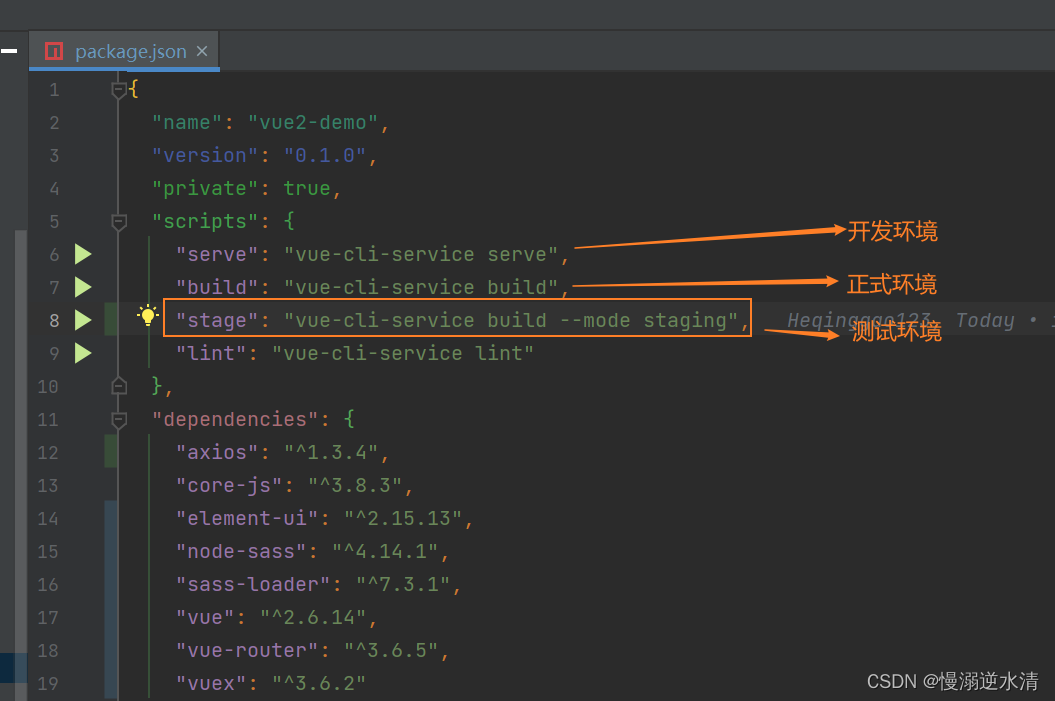
在packge.json的scripts里添加"stage": "vue-cli-service build --mode staging",
- npm run serve运行成功后就会使用开发环境的环境变量
- npm run bulid打包过程中里的js文件会使用正式环境的环境变量
- 同理,npm run stage打包过程中里的js文件会使用测试环境的环境变量
config/index.js
/**
 * 以 VUE_APP_ 开头的变量,在代码中可以通过 process.env.VUE_APP_ 访问。
 * 比如,VUE_APP_ENV = 'development' 通过process.env.VUE_APP_ENV 访问。
 * 除了 VUE_APP_* 变量之外,在你的应用代码中始终可用的还有两个特殊的变量NODE_ENV 和BASE_URL
 */
// 根据环境引入不同配置 process.env.VUE_APP_ENV
const environment = process.env.VUE_APP_ENV || "production";
const config = require("./env." + environment);
module.exports = config;
config/env.*.js
env.development.js
// 本地环境配置
module.exports = {
  title: "testDemo",
  baseApi: "http://localhostxxx/api", // 本地api请求地址
  port: 8080,
};
env.staging.js
// 测试环境配置
module.exports = {
  title: "testDemo",
  baseApi: "http://testxxx/api",
  port: 8081,
};
env.productionxxx.js
// 正式环境配置
module.exports = {
  title: "testDemo",
  baseApi: "http://productionxxx/api",
  port: 8082,
};
项目目录(我这里就是vue2-demo)/.env.*
.env.development
NODE_ENV='development'
# must start with VUE_APP_
VUE_APP_ENV = 'development'
.env.staging
NODE_ENV='staging'
# must start with VUE_APP_
VUE_APP_ENV = 'staging'
.env.production
NODE_ENV='production'
# must start with VUE_APP_
VUE_APP_ENV = 'production'
vue.config.js (基础配置+代理跨域、sass全局样式、图标引入、打包分析、生成环境去除console.log、splitChunks 单独打包第三方模块)
- sass全局样式需要安装node-sass和sass-loader。
我的node版本是14.15.4。运行下面命令。如图所示。
npm install node-sass@4.14.1 sass-loader@12.0.0 -D
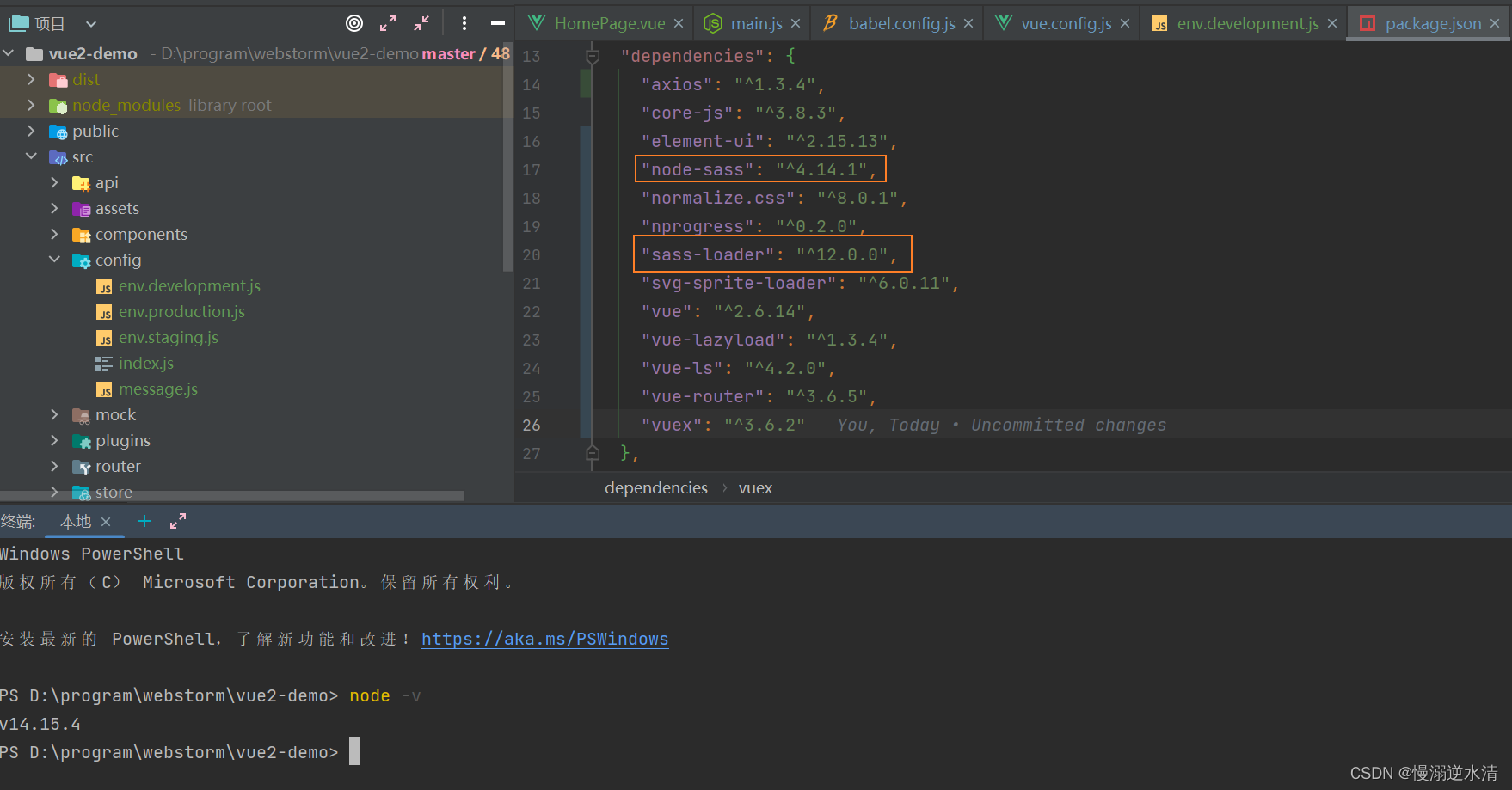
参考:
安装 node-sass 和 sass-loader 的过程及各 node 版本对应的 node-sass 版本号
Sass详解
sass官网
-
图标引入需要安装svg-sprite-loader ,将svg图片以雪碧图的方式在项目中加载。
雪碧图是一种将多个图片资源合并成一张大图片的做法,用到网页,能减少 HTTP 请求数量,以及提前加载一些还未使用的小图片。
npm i svg-sprite-loader
有两种方式——使用iconfont 集成到项目、使用svg图标。
参考:
Vue中使用图标的两种常用方式
手把手,带你优雅的使用 icon
-
打包分析需要安装webpack-bundle-analyzer(打包分析可视化工具)
npm install webpack-bundle-analyzer -D
-
runtime.js处理策略。
npm add html-webpack-plugin script-ext-html-webpack-plugin -D
-
vue.config.js代码如下。
"use strict";
const path = require("path");
const defaultSettings = require("./src/config/index.js");
const BundleAnalyzerPlugin =
  require("webpack-bundle-analyzer").BundleAnalyzerPlugin;
function resolve(dir) {
  return path.join(__dirname, dir);
}
const name = defaultSettings.title || "testDemo";
// 生产环境,测试和正式
const IS_PROD = ["production", "prod"].includes(process.env.NODE_ENV);
const { defineConfig } = require("@vue/cli-service");
module.exports = defineConfig({
  // publicPath: './', // 署应用包时的基本 URL。 vue-router hash 模式使用
  //署应用包时的基本 URL。  vue-router history模式使用
  publicPath: "/",
  //  生产环境构建文件的目录
  outputDir: "dist",
  //  outputDir的静态资源(js、css、img、fonts)目录
  assetsDir: "static",
  //保存是否校验eslint
  lintOnSave: !IS_PROD,
  // js调试源码映射地图,如果你不需要生产环境的 source map,可以将其设置为 false,即打包时不会生成 .map 文件,以加速生产环境构建。
  productionSourceMap: false,
  // 默认情况下 babel-loader 会忽略所有 node_modules 中的文件。你可以启用本选项,以避免构建后的代码中出现未转译的第三方依赖。
  transpileDependencies: false,
  devServer: {
    port: defaultSettings.port, // 端口
    open: false, // 启动后打开浏览器
    client: {
      overlay: {
        //当出现编译器错误或警告时,在浏览器中显示全屏覆盖层
        //设置错误在页面弹出、警告不在页面弹出
        warnings: false,
        errors: true,
      },
    },
    //proxy代理
    /**
     * 代理定义
     * 正向代理:替客户端向服务器发送请求,可以解决跨域问题
     * 反向代理:替服务器统一接收请求。
     */
    proxy: {
      //配置跨域
      "/api": {
        target: defaultSettings.baseApi,
        // ws:true,
        changOrigin: true,
        pathRewrite: {
          "^/api": "",
        },
      },
    },
  },
  configureWebpack: (config) => {
    config.name = name;
    // 为生产环境修改配置...
    /**
     * 依赖模块采用第三方cdn资源
     * externals: {
     * '包名' : '在项目中引入的名字'
     *         'vue': 'Vue',
     *         'vuex': 'Vuex',
     *         'vue-router': 'VueRouter',
     *         'element-ui': 'ELEMENT'
     *     }
     */
    // if (IS_PROD) {
    //   // externals
    //   config.externals = externals
    // }
    // 取消webpack警告的性能提示
    config.performance = {
      hints: "warning",
      //入口起点的最大体积
      maxEntrypointSize: 50000000,
      //生成文件的最大体积
      maxAssetSize: 30000000,
      //只给出 js 文件的性能提示
      assetFilter: function (assetFilename) {
        return assetFilename.endsWith(".js");
      },
    };
  },
  css: {
    extract: IS_PROD, // 是否将组件中的 CSS 提取至一个独立的 CSS 文件中 (而不是动态注入到 JavaScript 中的 inline 代码)。
    sourceMap: false,
    loaderOptions: {
      //专门用来全局颜色、变量、mixin,千万不要引入全局样式,要不然每个页面都会重复引用
      scss: {
        // 向全局sass样式传入共享的全局变量, $src可以配置图片cdn前缀
        // 详情: https://cli.vuejs.org/guide/css.html#passing-options-to-pre-processor-loaders
        // $cdn: "${defaultSettings.$cdn}";
        additionalData: `
          @import "@/assets/styles/variables.scss"; //项目存放scss变量地址
          `
      }
    }
  },
  chainWebpack: (config) => {
    // 目录别名 alias
    config.resolve.alias.set("@", resolve("src"));
    // .set("assets", resolve("src/assets"))
    // .set("api", resolve("src/api"))
    // .set("views", resolve("src/views"))
    // .set("components", resolve("src/components"));
    /**
     * cdn = {
     *     css: [
     *       'https://unpkg.com/element-ui/lib/theme-chalk/index.css' // element-ui css 样式表
     *     ],
     *     js: [
     *       // vue must at first!
     *       'https://unpkg.com/vue@2.6.12/dist/vue.js', // vuejs
     *       'https://unpkg.com/element-ui/lib/index.js', // element-ui js
     *       'https://cdn.jsdelivr.net/npm/xlsx@0.16.6/dist/xlsx.full.min.js', // xlsx
     *     ]
     *     }
     * 原文链接:https://blog.csdn.net/Wy_so_serious/article/details/121044173
     */
    // config.plugin('html').tap(args => {
    //   if (IS_PROD) {
    //     args[0].cdn = cdn.build
    //   } else {
    //     args[0].cdn = cdn.dev
    //   }
    //   return args
    //  })
    // const oneOfsMap = config.module.rule("scss").oneOfs.store;
    // oneOfsMap.forEach(item => {
    //   item
    //     .use("style-resources-loader")
    //     .loader("style-resources-loader")
    //     .options({
    //       // 这里的路径不能使用 @ 符号,否则会报错
    //       // patterns: ["./src/assets/reset1.less", "./src/assets/reset2.less"]
    //       patterns: "./src/assets/styles/variables.scss"
    //     })
    //     .end()
    // })
    /**
     * 设置保留空格
     */
    config.module
      .rule("vue")
      .use("vue-loader")
      .loader("vue-loader")
      .tap((options) => {
        options.compilerOptions.preserveWhitespace = true;
        return options;
      })
      .end();
    // config.module.rule('images')
    //   .use('url-loader')
    //   .tap(options => ({
    //     //[hash:10]取图片的hash的前10位
    //     //[ext]取文件原来扩展名
    //     name: './assets/images/[name].[ext]',
    //     quality: 85,
    //     limit: 8 * 1024, //
    //     // encoding: true, // 默认为true, 是否使用默认编码base64,可以["utf8","utf16le","latin1","base64","hex","ascii","binary","ucs2"]
    //     // generator: '', // 类型:{Function},默认值:() => type/subtype;encoding,base64_data,可以自定义数据编码。
    //     esModule: false, // 关掉es6模块化解析
    //     // fallback: 'file-loader',  //指定当目标文件的大小超过限制时要使用的备用加载程序
    //   }));
    config.module.rule("images").set("parser", {
      dataUrlCondition: {
        maxSize: 8 * 1024, // 小于8K的图片将直接以base64的形式内联在代码中,可以减少一次http请求。
      },
    });
    // svg-sprite-loader 将svg图片以雪碧图的方式在项目中加载
    config.module.rule("svg").exclude.add(resolve("src/assets/icons")).end();
    config.module
      .rule("icons")
      .test(/\.svg$/) //添加匹配规则
      .include.add(resolve("src/assets/icons")) //添加我们要处理的文件路径 svg图片地址
      .end() //上面的add方法改变了上下文,调用end()退回到include这一级
      .use("svg-sprite-loader") //使用"svg-sprite-loader"这个依赖
      .loader("svg-sprite-loader") //选中这个依赖
      .options({
        // 这个配置是这个包的配置不属于webpack,可以查看相关文档,symbolId指定我们使用svg图片的名字
        symbolId: "icon-[name]",  // 使用图标的方式 icon-文件名
      }) //传入配置
      .end();
    /**
     * 打包分析
     * https://blog.csdn.net/formylovetm/article/details/126424858
     */
    if (IS_PROD) {
      config.plugin("webpack-report").use(BundleAnalyzerPlugin, [
        {
          analyzerMode: "static",
        },
      ]);
    }
    /**
     * 是否开启源码映射调试
     * https://www.cnblogs.com/suwanbin/p/16901247.html
     * 浏览器上调试代码的问题,但是代码在显示的时候会出现压缩编码等问题,代码和原来就不一样,这时候需要打开调试模式.
     * source-map: 在外部生成一个文件,在控制台会显示 错误代码准确信息 和 源代码的错误位置
     * inline-source-map: 内嵌到bundle.js中, 只生成一个source-map,在控制台会显示 错误代码准确信息 和 源代码的错误位置
     * hidden-source-map: 外部,错误代码错误原因,源代码的错误位置,不能追踪源代码错误,只能提示到构建后代码的错误位置
     * eval-source-map: 内嵌,每一个文件都生成对应的source-map,在控制台会显示 错误代码准确信息,源代码的错误位置
     * nosources-source-map: 外部,错误代码准确信息,没有任何源代码信息
     * cheap-source-map: 外部,错误代码准确信息,源代码的错误位置,只能精准到行
     * cheap-module-source-map: 外部,错误代码准确信息,源代码的错误位置,module会将loader的source-map加入
     *
     * 内嵌与外部的区别: 1.外部生成单独的文件,内嵌没有 2.内嵌构建速度快
     * 这么多source-map如何选择?
     * 开发环境:速度快,调试更友好
     * 速度快( eval>inline>cheap>··· )
     * 组合eval-cheap-source-map > eval-source-map,调试更友好
     * source-map > cheap-module-source-map > cheap-source-map
     * 最终结果:cheap-module-source-map 和 eval-source-map (vuecli与react脚手架默认)
     *生产环境:源代码要不要隐藏?调试要不要更友好
     *内嵌会让代码体积变大,所以在生产环境下不用内嵌
     *  nosources-source-map全部隐藏
     * hidden-source-map 只隐藏源代码,会提示构建后代码错误信息
     * 最终结果:source-map 和 cheap-module-source-map
     */
    config
      // https://webpack.js.org/configuration/devtool/#development
      .when(!IS_PROD, (config) => config.devtool("cheap-module-source-map"));
    config.when(IS_PROD, (config) => {
      /**
       * Vue预渲染prerender-spa-plugin+vue-meta-info
       * https://blog.csdn.net/milkgan/article/details/127509160
       * 只有少量页面需要SEO优化
       * 仅仅提高首屏的渲染速度,且首屏的几乎只有静态数据的情况
       * preload 预加载,提前预加载提高切换路由的体验,加上这个,会打包报错
       * Vue CLI 4.5 和更早版本会使用 Preload 技术
       */
      // config.plugin("preload").tap(() => [
      //   {
      //     rel: "preload",
      //     // to ignore runtime.js 注:这里要把 runtime 代码的 preload 去掉。
      //     fileBlacklist: [/\.map$/, /hot-update\.js$/, /runtime\..*\.js$/],
      //     include: "initial"
      //   }
      // ]);
      /**
       * https://blog.csdn.net/qq_36278221/article/details/128042470
       * 多页面打包配置
       * Object.keys(pages).forEach((element) => {
       *         config.plugin('preload-' + element).tap(() => [
       *           {
       *             rel: 'preload',
       *             // to ignore runtime.js
       *             fileBlacklist: [/\.map$/, /hot-update\.js$/, /runtime\..*\.js$/],
       *             include: 'initial',
       *           },
       *         ])
       *         config
       *           .plugin("ScriptExtHtmlWebpackPlugin")
       *           .after('html-' + element)
       *           .use('script-ext-html-webpack-plugin', [
       *             {
       *               // `runtime` must same as runtimeChunk name. default is `runtime`
       *               inline: /runtime\..*\.js$/,
       *             },
       *           ])
       *           .end()
       *         config.plugins.delete('prefetch-' + element)
       *       })
       * runtime.js 处理策略
       * 根据路由驱动页面的 runtime 代码默认情况是包含在 build 后的 app.hash.js 内的,如果我们改动其他路由,就会导致 runtime 代码改变。从而不光我们改动的路由对应的页面 js 会变,含 runtime 代码的 app.hash.js 也会变,对用户体验是非常不友好的。
       * 为了解决这个问题要设定 runtime 代码单独抽取打包:
       *  config.optimization.runtimeChunk('single')
       * 但是 runtime 代码由于只是驱动不同路由页面的关系,代码量比较少,请求 js 的时间都大于执行时间了,
       * 所以使用 script-ext-html-webpack-plugin 插件将其内链在 index.html 中比较友好。
       */
      config
        .plugin("ScriptExtHtmlWebpackPlugin")
        .after("html")
        .use("script-ext-html-webpack-plugin", [
          {
            // 将 runtime 作为内联引入不单独存在
            inline: /runtime\..*\.js$/,
          },
        ])
        .end();
      //当有很多页面时,会导致太多无意义的请求
      config.plugins.delete("prefetch");
      /**
       * https://blog.csdn.net/weixin_44786530/article/details/126936033
       * 去掉代码中的console和debugger和注释
       */
      config.optimization.minimizer("terser").tap((options) => {
        options[0].terserOptions.compress.warnings = false;
        options[0].terserOptions.compress.drop_console = true;
        options[0].terserOptions.compress.drop_debugger = true;
        options[0].terserOptions.compress.pure_funcs = ["console.log"];
        options[0].terserOptions.output = {
          //删除注释
          comments: false,
        };
        return options;
      });
      /**
       * chunks 资源分块
       * 如果使用了某些长期不会改变的库,像 element-ui ,打包完成有 600 多 KB ,
       * 包含在默认 vendor 中显然不合适,每次用户都要加载这么大的文件体验不好,所以要单独打包
       */
      config.optimization.splitChunks({
        chunks: "all",
        cacheGroups: {
          // cacheGroups 下可以可以配置多个组,每个组根据test设置条件,符合test条件的模块
          commons: {
            name: "chunk-commons",
            test: resolve("src/components"),
            minChunks: 3, //  被至少用三次以上打包分离
            priority: 5, // 优先级
            reuseExistingChunk: true, // 表示是否使用已有的 chunk,如果为 true 则表示如果当前的 chunk 包含的模块已经被抽取出去了,那么将不会重新生成新的。
          },
          node_vendors: {
            name: "chunk-libs",
            chunks: "initial", // 只打包初始时依赖的第三方
            test: /[\\/]node_modules[\\/]/,
            priority: 10,
          },
          vantUI: {
            name: "chunk-elementUI", // 单独将 vantUI 拆包
            priority: 20, // 数字大权重到,满足多个 cacheGroups 的条件时候分到权重高的
            test: /[\\/]node_modules[\\/]_?element-ui(.*)/,
          },
        },
      });
      config.optimization.runtimeChunk("single"),
        {
          from: path.resolve(__dirname, "./public/robots.txt"), //防爬虫文件
          to: "./", //到根目录下
        };
    });
  },
  pluginOptions: {
    "style-resources-loader": {
      preProcessor: "sass",
      patterns: [],
    },
  },
});
参考:
Vue 配置全局样式(style-resources-loader)
设置全局css/less/sass样式and优化与style-resources-loader的理解
vue.config.js 全局配置
- sass全局样式需要安装node-sass和sass-loader。
- vueCli创建。
- 编程工具直接创建。
- vue.config.js (基础配置+代理跨域、sass全局样式、图标引入、打包分析、生成环境去除console.log、splitChunks 单独打包第三方模块)
上一篇:【前端】实际开发案例

- 关注我们
- 扫描二维码
- 获取更多信息
- 精彩一手掌握
 沪ICP备19022315号


